Tag: rna-seq

  • Streamlined RNA-Seq Analysis Using Nextflow

    Streamlined RNA-Seq Analysis Using Nextflow

    UPDATED: April 16, 2024

    nf-core is a community effort to collect a curated set of analysis pipelines built using Nextflow. This post will walk you through running the nf-core RNA-Seq workflow.

    The pipeline uses the STAR aligner by default, and quantifies data using Salmon, providing gene/transcript counts and extensive quality control. Prior to alignment, the pipeline uses Trim Galore to automatically trim low quality bases from the 3′ end of reads, and perform adapter trimming, attempting to auto-detect which adapter has been used (from the standard illumina, small rna, and nextera adapters). The pipeline runs a host of other QC tools, including DESeq2 to produce a PCA plot for sample-level QC (note that this requires a minimum of two replicates per library). Results are automatically compiled into a MultiQC report and can be emailed to you upon pipeline completion.

    While you have the option to provide reference genome index files to the pipeline, I recommend you provide only the FASTA and GTF files and let the pipeline generate these files the first time you run the workflow (for reproducibility), providing the --save_reference parameter so they can be saved for subsequent use (the index building step can be very time-consuming).

    Instead of a path to a file, a URL can be supplied to download reference FASTA and GTF files at the start of the pipeline with the --downloadFasta and --downloadGTF parameters.

    Alternatively, reference data can be obtained from AWS-iGenomes automatically by providing the --genome parameter (ex: --genome GRCh37).

    As per the documentation, it’s a good idea to specify a pipeline version when running the pipeline on your data. This ensures that a specific version of the pipeline code and software are used when you run your pipeline. If you keep using the same tag, you’ll be running the same version of the pipeline, even if there have been changes to the code since.

    To see what versions are available, go to the nf-core/rnaseq releases page and find the latest version number – numeric only (eg. 3.0). Then specify this when running the pipeline with -r (one hyphen) – eg. -r 3.0.

    The version number will be logged in reports when you run the pipeline, so that you’ll know what you used when you look back in the future.

    For additional options for trimming, ribosomal RNA removal, UMI-based read de-duplication, other alignment and quantification tools, and more see: https://nf-co.re/rnaseq/parameters

    NOTE: NYU CGSB users will require an additional step (step #1), and have the ability to publish their results to the department JBrowse server (step #6).

    1) Rename Fastq Files

    NOTE: This step is for NYU CGSB users only

    nf-core workflows expect standard illumina filenames by default. At NYU CGSB, fastq files are not named using the standard illumina file naming scheme. Therefore, CGSB users will need to run the following script prior to running any nf-core workflow. This script will create a folder within the target directory called ‘inames’ containing symlinks to the original data that use standard illumina filenames. CGSB users must then provide the path to the files in this ‘inames’ directory when creating the samplesheet (next step). Run this script as follows, providing the path to the reads and target directory as parameters:

    sh /scratch/work/cgsb/scripts/rename_fastq_files/rename_fastq_files.sh \
        <path_to_reads> \
        <target_dir>

    Example:

    sh /scratch/work/cgsb/scripts/rename_fastq_files/rename_fastq_files.sh \
        /scratch/cgsb/gencore/out/Gresham/2020-01-10_HV2J2BGXC/merged/ \
        /scratch/$USER/project_dir

    2) Prepare Samplesheet

    The pipeline requires a samplesheet in csv format as input. The samplesheet must contain the following five headers: group, replicate, fastq_1, fastq_2, strandedness.

    It is possible to include multiple runs of the same library in a samplesheet. The group and replicate identifiers are the same when you have re-sequenced the same sample more than once (e.g. to increase sequencing depth). The pipeline will concatenate the raw reads before alignment.

    strandedness can be forward, reverse, unstranded, or auto in which case the pipeline will attempt to automatically determine the strandedness of the reads.

    It is also possible to mix paired-end and single-end reads in a samplesheet.

    Below is an example of a samplesheet consisting of both single- and paired-end data. This is for two experimental groups in triplicate, where the last replicate of the treatment group has been sequenced twice.

    More information about samplesheets at the official docs: https://nf-co.re/rnaseq/usage#introduction

    3) Prepare Config File

    Copy this gist into your project directory and provide the path to your samplesheet, FASTA, GTF, and out_root, and your email address if you’d like to be notified when the pipeline completes or if there are any errors.

    4) Running the workflow

    Note: v3.0 of the RNA-Seq pipeline requires Nextflow 20.11.0-edge or higher.

    On the NYU HPC, you must submit nextflow pipelines as an SBATCH job.

    Copy and paste the code below into a file called launch-nextflow.s. Edit the path to your config file (-c) and version number (-r) as required, and add any additional parameters if necessary.

    Once you have created this file, submit it to SLURM using the following command:

    sbatch launch-nextflow.s

    5) Output

    Once the pipeline has completed, you will find your output files in the results directory within the directory you set as out_root in the config.

    If you provided your email address, you will receive notification via email when your pipeline completes with information pertaining to your analysis as well as a comprehensive MultiQC report attached. If you did not provide your email address, you can find the MultiQC report in the results directory.

    6) JBrowse

    CGSB users have the option to push their results to JBrowse for visualization. To push data to JBrowse you will need to request access at https://forms.bio.nyu.edu if you have not already done so (requires PI approval). Then, simply execute the following command:

    cgsb_upload2jbrowse \
        -p PI \
        -d DATASET \
        $ref \
        $gff3 \
        --profile nf-rnaseq \
        --root ROOTPATH

    Example:

    cgsb_upload2jbrowse \
        -p Gresham \
        -d project-name \
        /path/to/ref.fa.gz \
        /path/to/ref.gff3 \
        --profile nf-rnaseq \
        --root /scratch/netID/rnaseq_project/results/

    7) Citing

    If you use nf-core/rnaseq for your analysis, please cite it using the following doi: 10.5281/zenodo.1400710

    In addition, cite the nf-core publication as follows:

    The nf-core framework for community-curated bioinformatics pipelines.
    Philip Ewels, Alexander Peltzer, Sven Fillinger, Harshil Patel, Johannes Alneberg, Andreas Wilm, Maxime Ulysse Garcia, Paolo Di Tommaso & Sven Nahnsen.
    Nat Biotechnol. 2020 Feb 13. doi: 10.1038/s41587-020-0439-x.

    Additional Comments

    Recently, I observed this warning message immediately upon launching the pipeline (for documentation purposes, this was version 3.14.0):

    WARN: ~~~~~~~~~~~~~~~~~~~~~~~~~~~~~~~~~~~~~~~~~~~~~~~~~~~~~~~~~~~~~~~~~~~~~~
      Multiple config files detected!
      Please provide pipeline parameters via the CLI or Nextflow '-params-file' option.
      Custom config files including those provided by the '-c' Nextflow option can be
      used to provide any configuration except for parameters.
    
      Docs: https://nf-co.re/usage/configuration#custom-configuration-files
    ~~~~~~~~~~~~~~~~~~~~~~~~~~~~~~~~~~~~~~~~~~~~~~~~~~~~~~~~~~~~~~~~~~~~~~~~~~~~

    It appears that we need to move our parameters into a separate JSON file, and provide this file to the pipeline using the -params-file option. According to the documentation, this is necessary for nf-core pipelines using DSL2, which was implemented in version 2.0 of this pipeline. The warning message above, displayed upon running the pipeline, instructs us to provide pipeline parameters via the -params-file option. However, the documentation clarifies that “For Nextflow DSL2 nf-core pipelines – parameters defined in the parameter block in custom.config files WILL NOT override defaults in nextflow.config“, which might mean that you can keep your parameters in your nextflow.config file. This suggests that even though it’s possible to keep parameters in your nextflow.config file, as evidenced by my tests where the pipeline runs with all parameters in the nextflow.config file, you will still receive the warning message. Similarly, the warning will appear even when using a JSON file with the -params-file option. If you choose or need to use a JSON file for your parameters as indicated in the warning message, here is how you would proceed:

    Create the JSON file with your parameters as shown below. Save this file as nf-params.json. (See documentation for JSON format here)

    {
      "input": "/path/to/samplesheet.csv",
      "fasta": "/path/to/ref.fa",
      "gtf": "/path/to/ann.gtf",
      "email": "netID@nyu.edu",
      "outdir": "/scratch/netID/rnaseq_project"
    }

    Update your nextflow command to include -params-file and the path to your json file.

    nextflow run nf-core/rnaseq \
            -profile singularity \
            -c nextflow.config \
            -params-file nf-params.json \
            -r 3.14.0 \
            --save_reference
  • Single Cell RNA-Seq Allows For An Unprecedented Look At Plant Root Meristem Cell Identity

    Single Cell RNA-Seq Allows For An Unprecedented Look At Plant Root Meristem Cell Identity

    In the Kenneth Birnbaum Lab, we are interested in understanding how the plant root is able to grow continuously over the plant’s life and maintain its specific root structure (Fig.1). More specifically, what is the role of the stem cells present at the very tip of the root (QC and initials), in this maintenance and development.

    Figure 1: The plant model Arabidopsis thaliana has a very simple but highly organized Root apical meristem. It is from the division of the QC cells (in grey) and the initials (highlighted in black) that  all other cells mature and develop as they move away from the QC.

    The fascinating part of plant growth in general is its capacity of continuous growth over the plant’s life. This is due to a very specific set of embryonic cells located at the very tip of the root or shoot, respectively called the Root or Shoot Apical meristem (RAM or SAM). In the case of the root, these cells slowly divide to give rise to the different cell types constituting the root. From these first divisions, cells continue to divide and differentiate, forming a gradient until they fully mature to form the functional root.

    During this process very specific sets of genes are successively activated and repressed to allow this slow maturation along the meristem. In addition, these distinct genetic programs are different depending on the cell type composing the meristem. However, so far technical limitations have prevented researchers from having full knowledge of these specific genes.

    The power of single cell RNA seq (scRNA-seq) allows us to get a complete snapshot of every cell composing the meristem and recreate a transcriptome map allowing us to decipher the multiple mechanisms of cell maturation.

    At the Genomics Core at NYU, we use Illumina sequencing and the new Chromium system from 10X Genomics to analyze data.

    This new procedure of single cell RNA-seq is actually quite simple:

    The first crucial step is to get the single cells from the root tip of our plant of interest. To perform this step, we rely on a cocktail of enzymes able to digest the complex cell wall matrix that binds the cells together. We do this as follows:

    Seedlings of the plant model Arabidopsis thaliana are grown in vitro on MS medium, and at the appropriate age root tips are sectioned and transferred into our cocktail of enzymes. After 1-2h the cell wall is digested, and cells are freely released in solution. Cells are then washed from the enzyme, carefully counted to assess their quality and viability and then directly processed through the 10X chromium system.

    This machine combines together, through a microfluidic device, the plant cells with poly-T beads and releases them into a droplet of oil. The final product is an emulsion of thousands of droplets containing the cells and the beads (Fig.2).

    Figure 2: Workflow of single cell RNA-seq.

    The cDNA synthesis is performed directly inside each droplet allowing for rapid and easy processing, and preventing RNA degradation. As each bead contains a distinct specific barcode, cDNA from the same droplet get the same barcode necessary to sequence and identify the cell.

    Sequencing of the 10x libraries is performed on site by the Genomics Core team and data is aligned on the genome of interest using software provided by 10x genomics called Cell Ranger. Data are then analyzed using the R package Seurat, developed at NYU and the New York Genome Center by the team of Rahul Satija.

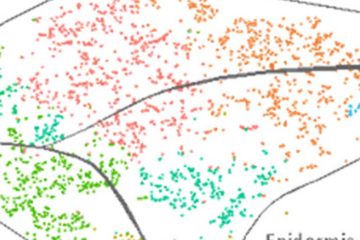
    Seurat allows for the clustering of all sequenced cells depending on their respective transcriptome. Identification of cluster cell identity  is performed by comparing marker gene expression and previously published transcriptome data (Fig. 3).

    Results obtained allow us to draw a map containing every cell type present in the meristem of the plant model Arabidopsis thaliana. In addition, we are able to draw the maturation path of the cells by identifying younger and older tissue (Fig. 3 arrows). This map is of unprecedented accuracy and constitutes the starting point to identify new genes and mechanisms specific to each cell type.

    Moreover, single cell analysis can be performed on Arabidopsis mutants, meristem after wounding, or specific treatments to identify cell type specific response and genetic programs involved. This is the ongoing work performed in Kenneth Birnbaum lab, and specifically on root regeneration.

    Figure 3: TSNE plot obtained using the R package Seurat, each dot corresponds to a single cell sequenced. The cells are aggregated in clusters represented by different colors according to their transcriptome. The identification of the cell identity in the original arabidopsis root is performed by comparing expression of key marker genes of the different cell types. On the upper right shown in blue is the expression of an endodermal marker, similarly the graph on the lower right shows the expression of a columella and lateral root cap marker.

  • Analyze your Data Faster with NASQAR: Nucleic Acid SeQuence Analysis Resource

    Analyze your Data Faster with NASQAR: Nucleic Acid SeQuence Analysis Resource

    The bioinformatics team at the NYU Center for Genomics and Systems Biology in Abu Dhabi and New York have recently developed NASQAR (Nucleic Acid SeQuence Analysis Resource), a web-based platform providing an intuitive interface to popular R-based bioinformatics data analysis and visualization tools including Seurat, DESeq2, Shaman, clusterProfiler, and more.

    These tools, although powerful, typically require significant computational experience and lack a graphical user interface (GUI), making them inaccessible to many researchers. NASQAR addresses this problem by wrapping these tools in a beautifully simple UI, allowing users to explore their data in seconds using various tools and visualization methods. Users also have the ability to download analysis results and a wide array of figures.

    The SeuratV3 Wizard in NASQAR

    Behind the scenes data pre-processing allows for a seamless transition to downstream analysis, and sample data included with each app allows users to take a test drive without having any data on hand.

    The web app lowers the entry barrier and provides greater independence for researchers with little or no computational experience to carry out standard bioinformatics analysis, visualize their data, and produce publication-ready data files and figures.

    The platform is publicly accessible at http://nasqar.abudhabi.nyu.edu/.

    NASQAR is open-source and the code is available through GitHub at https://github.com/nasqar/NASQAR.

    NASQAR is also available as a Docker image at https://hub.docker.com/r/aymanm/nasqarall.

    Let us know what you think in the comments below!

  • Salmon & kallisto: Rapid Transcript Quantification for RNA-Seq Data

    Salmon & kallisto: Rapid Transcript Quantification for RNA-Seq Data

    Salmon and kallisto might sound like a tasty entree from a hip Tribeca restaurant, but the duo are in fact a pair of next-generation applications for rapid transcript quantification. They represent a new approach to transcript quantification using NGS that has a number of advantages over existing alignment-based methods. I’ve tried them both out and provide my thoughts below.

    We are used to quantification methods that rely on full base-to-base alignment of reads to a reference, but newer methods leverage the idea that that when quantifying reads, the necessary information is not where in a transcript a read aligns, but only which transcripts could have generated the read. This idea renders base-level alignment, which has been the computational bottleneck until now, unnecessary for this analysis. Because this approach does not involve actual alignment to the genome, it is sometimes referred to as ‘pseudoalignment’.

    kallisto

    Pros:

    • Extremely Fast & Lightweight – can quantify 20 million reads in under five minutes on a laptop computer
    • Easy to use
    • Sleuth – an interactive R-based companion for exploratory data analysis

    Cons:

    • No support for stranded libraries
      Update: kallisto now offers support for strand specific libraries

    kallisto, published in April 2016 by Lior Pachter and colleagues, is an innovative new tool for quantifying transcript abundance. kallisto uses the concept of ‘pseudoalignments’, which are essentially relationships between a read and a set of compatible transcripts. kallisto obtains highly accurate pseudoalignments efficiently using k-mers together with the transcriptome de Bruijn graph (T-DBG). Grouping of pseudoalignments belonging to the same set of transcripts into equivalence classes allows for a simpler model and more efficient use of underlying algorithms. The result is a tool which is able to quantify a paired-end library with 22 million reads in 3.5 minutes on a single-core with 8GB of memory.

    total_run_time_chart

    Both kallisto and Salmon are magnitudes faster than Tophat + Cufflinks. Times computed on 22M read PE illumina dataset, 1 CPU core and 8GB memory.

    Speed is great, but accuracy is critical. The plot below displays a high correlation (r = 0.941) between results obtained by kallisto and Cufflinks. You can see that the majority of differences are for transcripts with low expression levels.

    kallisto is self-described as being ‘near optimal’. In this case, ‘optimal’ refers to two key aspects of the analysis: Speed and Accuracy. While the benchmark for accuracy can be determined by comparing results to a known “gold standard” data set or results from other existing tools, the benchmark for speed is typically based on how fast an input file can be read. A good way to measure optimal speed is to calculate how long it takes to read through a file, the linux word count (wc) utility provides a measure of this. For example, if it takes your machine 45 seconds to perform a word count on a set of reads, 45 seconds could be considered the benchmark for speed in quantifying this set of reads (on your machine). You can see in the plot below that kallisto is taking just over twice as long as it takes to read through the file. That’s not bad for a complex problem of quantifying RNA-seq data!

    optimal-plot

    The linux word count (wc) utility can serve as a benchmark for ‘optimal’ speed.

    A companion to kallisto, sleuth is an R-based program for exploratory data analysis powered by Shiny. The tools in sleuth allow you to investigate transcript abundance data or combine results from multiple samples for differential expression analysis. Interactive tools to explore scatterplots, volcano plots, MA plots, heat maps, PCA analysis, and more make analyzing your data faster and easier. For example, when examining a volcano plot, users can highlight a region of interest and immediately see a list of the transcripts selected in a table below.

    A Volcano Plot in sleuth
    Selecting points on a volcano plot brings up the transcripts corresponding to those points in the table below, in real time.

    Using the ID’s of the transcripts, users can drill down further and examine boxplots of transcript abundances to see technical variation in each sample and biological variation between conditions.

    Transcript View in sleuth
    Enter a transcript ID in transcript view, or a gene ID in gene view, to visualize technical and biological variation quickly.

    sleuth requires technical replicates for its analysis. In lieu of actual technical replicates, sleuth makes use of bootstrapped values which serve as accurate proxies. Bootstrapping here is the process of repeating the quantification analysis after resampling with replacement from the original data, in order to simulate random sampling associated with sequencing.

    sleuth computes differential expression using a statistical model that combines variance information from biological replicates as well as bootstrapped technical replicates to estimate true biological variance. A test of sleuth on data simulated according to the DESeq2 model found that sleuth significantly outperforms other methods (ex: DESeq2, edgeR). A preprint is forthcoming.

    The power of kallisto and sleuth lie in their speed and ease of use. A user can go from raw reads to analysis in minutes. As impressive as kallisto is, one major drawback is that its simplified model makes it unable to account for strandedness in reads. This seems like a major limitation given that most RNA-seq protocols generated stranded information.. If support for strandedness is a requirement for your analysis, check out Salmon below. Update: kallisto now offers support for strand specific libraries

    Salmon

    Pros:

    • Fast & Lightweight – can quantify 20 million reads in under eight minutes on a desktop computer
    • Support for strand-specific libraries
    • Accepts BAM and FASTQ files as input

    Cons:

    • No automatic support for compressed input files

    From the creators of Sailfish, Salmon (released but unpublished) is another rapid quantification tool which leverages k-mer based counting to produce, in Salmon terms, ‘quasi-alignments’. Although Salmon is not quite as fast as kallisto and lacks some features such as seamless support for compressed files, its strong point is its ability to learn and account for the effects of experiment-specific parameters and biases, including support for strand-specific RNA-seq data.

    In the data set used, the correlation between results obtained by Salmon and Cufflinks (r = 0.939) is nearly identical to that between kallisto and Cufflinks (r = 0.941).

    Another feature Salmon offers is the ability to quantify pre-existing alignments (from BAM files). This means that if you already have BAM alignments (or will need BAMs for other reasons), you can provide Salmon with these. If you don’t have BAM files, you can provide your reads in fastq format and Salmon will create the quasi-alignments ‘wicked-fast’, and then quantify them.

    Finally, if you’re quantifying your data with Salmon and would like to use sleuth for downstream analysis, you’re in luck. The creators of Salmon have created an R library called wasabi which prepares Salmon (and Sailfish) output for use with sleuth.

    The latest versions of Salmon, kallisto, sleuth, and wasabi are available for use on Mercer.

    Getting Started (on Mercer)

    kallisto

    module load kallisto/intel/0.42.5
    kallisto quant -i <kallisto_index> -o <output_dir> <read_1.fastq> <read_2.fastq>

    To produce bootstrap values for downstream analysis with sleuth (in this example, 100 bootstraps):

    kallisto quant -i <kallisto_index> -o <output_dir> -b 100 <read_1.fastq> <read_2.fastq>


    sleuth

    ! If your data is on mercer, run sleuth in a VNC session for web browser functionality
    ! On mercer, It is necessary to load Firefox or a browser of your choice prior to launching R
    module load r/intel/3.2.2
    module load firefox
    R
    >library("sleuth")
    >base_dir<-(“/scratch/<netID>/kallisto-results/”)
    

    The next step requires describing the experimental design and the relationship between the kallisto directories and the samples, which is variable depending on your experimental design and kallisto output structure. The final steps involve creating the sleuth object and performing the differential expression calculations, which take only a couple minutes in total to complete. Once these steps are complete, an interactive browser session can be launched. Please see Introduction to Sleuth for more.

    Salmon

    module load salmon/gnu/0.6.0
    salmon quant -i <salmon_index> -l <lib_type> -1 <read_1.fastq> -2 <read_2.fastq> -o <output_dir>

    In this example, we quantify a paired end, stranded library (where read 1 comes from the reverse strand), from Arabidopsis thaliana, with 100 bootstraps:

    salmon quant -i A_thaliana_salmon_index -l ISR --numBootstraps 100 -1 read_1.fastq -2 read_2.fastq -o salmon_out


    Resources

    kallisto Paper:

    http://www.nature.com/nbt/journal/vaop/ncurrent/full/nbt.3519.html

    kallisto Manual:

    http://pachterlab.github.io/kallisto/manual.html

    Sleuth Blogpost:

    https://liorpachter.wordpress.com/2015/08/17/a-sleuth-for-rna-seq/

    Sleuth Tutorial:

    https://rawgit.com/pachterlab/sleuth/master/inst/doc/intro.html

    Salmon Preprint:

    http://biorxiv.org/content/early/2015/06/27/021592

    Salmon Manual:

    http://salmon.readthedocs.io/en/latest/salmon.html